No products in the cart.

When you master your document management, you’re not just cleaning up—you’re building a unified system for both your physical and digital worlds. It’s about creating consistency with smart naming, logical folders, secure storage, and clear guidelines on what to keep, transforming a chaotic desk into a launchpad for your best work.

Picture your workspace for a moment. Is it a calm, orderly library where any piece of information is just a moment away? Or is it a chaotic jumble of unsorted papers and messy digital folders? The difference isn't just about looks—it’s about reclaiming your time, your energy, and your creative spark.
Being disorganized is more than a small frustration; it's a huge drag on your productivity and focus. Every time you have to hunt for a misplaced invoice, search for a forgotten contract, or dig through buried project notes, you shatter your concentration and kill your momentum. This constant friction makes it nearly impossible to get into that state of "deep work" where your best ideas come to life.
This isn't just a hunch; the numbers back it up. Professionals can end up wasting a shocking 50% of their time just searching for information, with each document hunt taking an average of 18 minutes. In fact, challenges with documents can contribute to over 21% of total productivity loss, turning your desk from a place of inspiration into a source of stress.
The goal of document management isn't about imposing rigid, complicated rules. It’s about crafting an elegant, personalized system that feels intuitive and effortless to maintain.
Taking control of your paperwork and files is an empowering act. You're designing a more productive and inspiring environment that works for you, not against you.
By putting a few simple but powerful strategies in place, you can turn this daily battle into a source of clarity. A well-designed system lets you find exactly what you need in seconds, freeing up precious mental space for the work that truly matters. You’re building a foundation that supports your goals, rather than getting in the way of them.
This guide will lay out practical strategies that blend stylish physical tools with smart digital habits. We’ll walk through how to:
Build a Sanctuary: Create a physical filing system that is both functional and beautiful.
Design a Digital Cabinet: Structure your online files for instant searchability and access.
Create a Hybrid Workflow: Seamlessly bridge the gap between your paper and digital worlds.
Getting organized is a skill that pays you back every single day, turning chaos into a catalyst for creativity and focus. To really dig in, you can explore comprehensive document management best practices that cover every angle of an efficient system. Our own guide on https://www.blumonaco.com/blogs/content/how-to-organize-a-home-office also offers great tips for creating that perfect, productive space.

Before we jump into the digital deep end, let's get our hands on the real, tangible stuff: paper. Let's be honest, even in our hyper-connected world, a solid physical filing system is non-negotiable. It's the safe harbor for those critical, hard-to-replace documents like birth certificates, property deeds, and original contracts—not to mention the sentimental records that just feel better in your hand.
Building this sanctuary isn't about just shoving papers into a cabinet and calling it a day. It’s about creating an intentional, intuitive system that transforms your desk from a source of stress into your personal command center. The foundation for this amazing transformation is a simple yet incredibly powerful four-step framework: Sort, Purge, Categorize, and Contain.
Think of this framework as your personal blueprint for turning a mountain of paper into a masterpiece of efficiency. By tackling these stages in order, you create a logical flow that stops the overwhelm in its tracks and ensures every single document finds its perfect home.
Sort: Start by gathering every loose piece of paper from your workspace. Yes, every single one. Pile it all in one spot, and don't even think about organizing yet. The goal here is just to see the full scope of what you’re up against.
Purge: Now, it's time for some quick, decisive action. Go through the pile and immediately shred or recycle anything that’s outdated, irrelevant, or a duplicate. Be ruthless! This step is all about lightening the load.
Categorize: With a much smaller pile, start grouping the remaining papers into broad, logical categories. The key here is to create piles that make sense to you and how your brain works.
Contain: Finally, give each of those categories a designated, clearly labeled home within your new filing system.
This process is your first giant leap toward a calmer, more streamlined relationship with your paperwork. For a deeper dive, check out our guide to organizing paperwork at home.
The real magic of a great filing system is in its categories. Let's get one thing straight: generic labels like "Miscellaneous" or "To-Do" are where good intentions go to die. They quickly become black holes for forgotten paper. Instead, your goal is to create categories that are active and intuitive, mirroring the way you actually live and work.
Think of your categories as different zones in your life. A truly effective system usually mixes action-oriented files with reference-based ones.
Action-Oriented Files: These are for the papers that need you to do something, either now or in the near future.
Requires Action: Think bills to pay, forms to sign, or anything needing a direct response.
Awaiting Reply: This is for invoices you've sent, applications you've submitted, or anything you're waiting on someone else for.
Reference Files: This is the heart of your system, holding all the information you need to keep but don't need to act on right now.
Financial Records: Bank statements, tax documents, and investment reports.
Household Documents: Warranties, appliance manuals, and home repair records.
Vital Records: Birth certificates, passports, and social security cards (make sure these are stored somewhere extra secure!).
Your filing system should be a reflection of your life's priorities and projects. The more personalized your categories are, the more instinctively you'll use and maintain the system.
Once you've mapped out your categories, it's time to give them a home. This is where function and style finally get to meet. The idea is to choose storage solutions that not only get the job done but also make you feel good about being organized. It’s time to forget those drab, industrial filing cabinets of the past—today’s solutions are designed to actually complement your space.
Imagine a beautiful set of Blu Monaco hanging file folders in a stylish desktop organizer. Suddenly, your "Action" files become a vibrant, motivating part of your desk decor. For long-term storage, elegant file boxes can be tucked neatly onto a shelf, keeping those less-used documents safe, sound, and accessible.
By working through the Sort, Purge, Categorize, and Contain framework, you're doing so much more than just clearing clutter. You are intentionally designing a system that fuels your productivity and brings a genuine sense of calm and control to your workspace. This physical sanctuary is the bedrock of your entire document management strategy.
Let's take everything we love about a tidy physical desk—the clarity, the order, the ease—and bring it into our digital world. Creating a space where you can find exactly what you need in seconds isn't about buying fancy software. It's about building a simple, repeatable system that just works.
Think of your computer's hard drive as a massive, empty library. Without shelves, sections, and a card catalog, it’s just a chaotic pile of books. By designing your own digital filing cabinet, you’re building that essential structure, making sure every single file has an intuitive place to call home. The goal? To make "I can't find that file" a phrase you never have to say again.
First things first, let's architect your folder hierarchy. Picture a tree: it starts with a sturdy trunk (your main documents folder), which splits into large branches (your big-picture categories), then smaller branches (subfolders), and finally, leaves (your actual files). This top-down approach is the secret to avoiding that tangled mess of random folders that so often takes over our desktops.
Your main categories should mirror the big areas of your life or business. Keep it simple at the start, then get more specific as you go deeper.
Top-Level Folders (The Main Branches):
01_WORK
02_PERSONAL
03_FINANCE
04_ARCHIVE
Why the numbers? Simple. They let you control the order of your folders, keeping your most-used categories right at the top where you need them. From here, you can build out subfolders that make sense for each branch. For instance, your 01_WORK folder might split into CLIENTS, PROJECTS, and ADMIN.
A shallow folder structure is almost always better than a deep one. Aim for no more than three or four levels. If you have to click more than four times to find something, your system might be getting a little too complicated.
Once your folders are in place, the next game-changer is naming your files with purpose. A file called invoice.pdf or meeting notes.docx is practically invisible when you search for it and tells you nothing at a glance. A consistent naming convention is your secret weapon for finding any document in seconds flat.
The key is to create a formula and stick to it like glue. A fantastic, all-purpose formula is Date_Client/Project_DocumentType_Version. This simple structure forces your files to sort themselves chronologically and gives you all the vital info before you even open them.
Take a look at how this simple discipline transforms a messy folder into a clean, searchable list.
Use these templates to create consistent, searchable file names for common document types.
| Document Type | Naming Formula | Example |
|---|---|---|
| Client Invoice | YYYY-MM-DD_ClientName_Invoice |
2024-10-26_SmithCo_Invoice.pdf |
| Project Proposal | YYYY-MM-DD_ProjectName_Proposal_v1 |
2024-11-05_WebsiteRedesign_Proposal_v1.docx |
| Personal Receipt | YYYY-MM_Vendor_Receipt |
2024-10_HomeDepot_Receipt.jpg |
This disciplined approach means you stop relying on your memory to know where you saved a file, because the name itself tells its story. Adopting this is truly one of the most powerful best practices for document management you can implement.
An organized digital system is a beautiful thing, but it’s also fragile. A single hard drive failure, a stolen laptop, or a nasty virus could wipe out years of critical records. This is why a solid backup strategy isn’t just a nice-to-have—it’s an absolute must.
Think of it as digital insurance. You hope you never have to use it, but you'll be incredibly grateful it's there if disaster ever strikes. The gold standard here is the 3-2-1 Rule.
Three Copies: Keep three copies of your data—the original file on your computer and at least two backups.
Two Different Media: Store your copies on at least two different types of storage, like an external hard drive and a cloud service.
One Off-Site: Make sure at least one of those backups is stored in a completely different physical location.
For example, you could have the original files on your laptop, a weekly backup to an external hard drive you keep in your office, and a continuous, automatic backup to a cloud service like Google Drive or Dropbox. This redundancy creates a safety net, ensuring no single event can destroy all your data. Setting it up might take an afternoon, but the peace of mind it buys you is priceless.
Let’s be honest, the dream of a completely paperless office is still just that for most of us—a dream. The reality is that some documents just feel better, or are legally required to be, in physical form. The most effective systems don't force an all-or-nothing choice. Instead, they build a smart, seamless bridge between your physical and digital worlds.
This hybrid approach gives you the best of both: the tangible security of paper for your most critical items and the incredible, search-anything-from-anywhere power of digital for everything else. The core philosophy is simple but powerful: scan and shred. It’s about being intentional, deciding which documents truly earn a spot in your file cabinet and which can live a more efficient life as a digital file.
Going "paper-light" is about so much more than just decluttering your desk. It’s a strategic shift that boosts your security, saves money, and puts your information at your fingertips, wherever you are. When you digitize a document, you’re not just making a copy; you’re creating a more robust, searchable, and shareable asset.
This isn't just a hunch; it's where modern efficiency is heading. Projections show that by 2026, smarter workflows could cut operational costs by 30-50% and make processes run five times faster. Yet, a surprising 45% of small businesses still lean heavily on paper files, which just goes to show what a huge opportunity there is to get ahead of the curve. You can explore more about these document management trends and see the writing on the wall.
A hybrid system creates a single, unified source of truth. You’ll never have to wonder, "Is that file on my computer, or is it in the cabinet?" because your system will give you a clear answer every time.
So, how do you make the call? Which papers get scanned and which get saved? It really comes down to the document's purpose, its legal weight, and frankly, your own comfort level. A freelance designer, for instance, can scan client invoices and project receipts, turning tax season from a frantic paper chase into a simple click-and-send affair. A family can digitize insurance policies and school records, ensuring they’re instantly available in an emergency.
Here’s a quick mental checklist to run through:
Is an original copy legally required? Things like birth certificates, wills, property deeds, and car titles are non-negotiable. Keep the hard copies safe and sound.
Is it for short-term reference? Utility bills, bank statements, and everyday receipts are perfect candidates for scanning and shredding. Most institutions provide digital originals now anyway.
Does it have sentimental value? Children's artwork, old letters, and precious photos can be digitized for backup, but you’ll almost certainly want to keep the originals.
Is it an active project document? Scan it. This makes sharing with collaborators a breeze and keeps version control from becoming a nightmare.
This decision tree gives you a great visual for mapping out your digital filing process and figuring out the right home for every document.
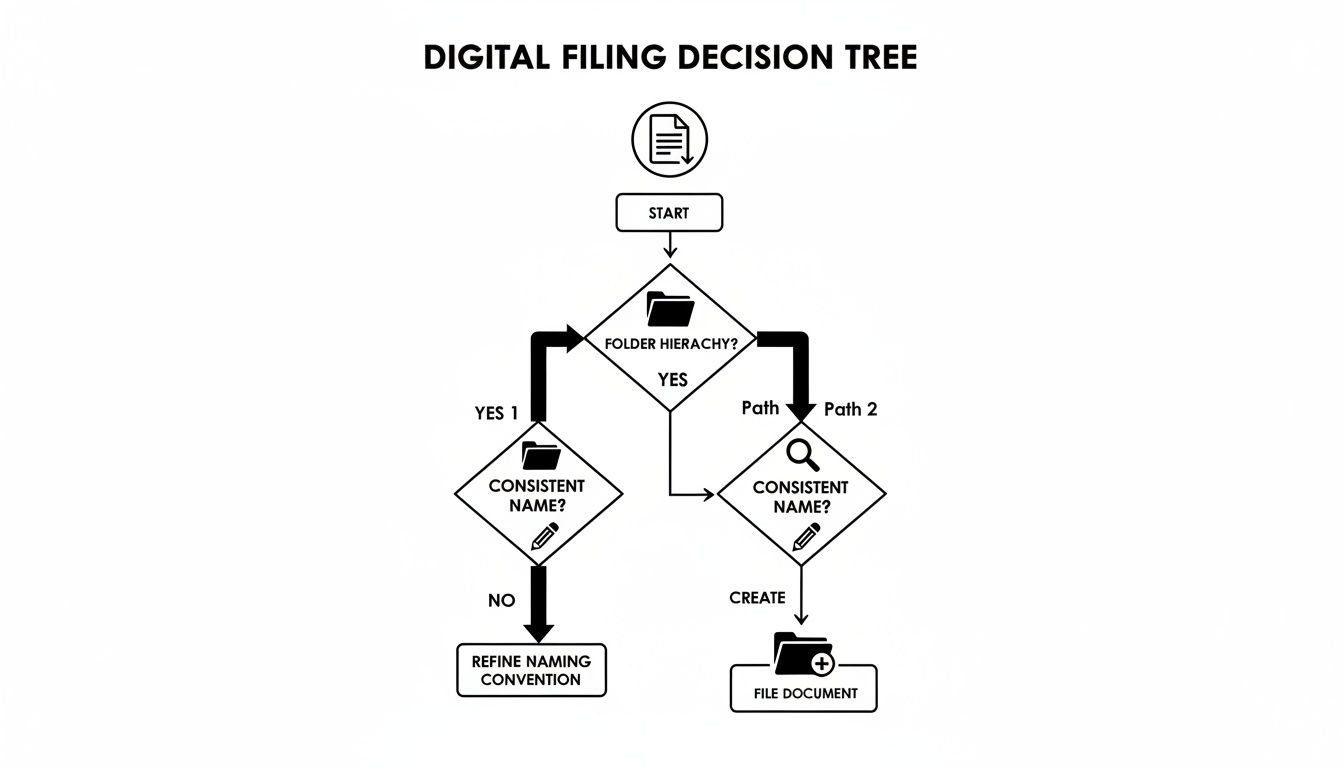
As the flowchart shows, a consistent folder structure and clear naming conventions are the bedrock of any good digital system. And as you bridge that gap between physical and digital, a great tool like a professional portfolio binder can be the perfect "inbox" for papers waiting to be scanned. By mastering this hybrid workflow, you're not just getting organized—you're building a system that’s resilient, efficient, and perfectly suited to your life.
You did it. You took a mountain of chaos and carved out a sanctuary of order. But an organized space, much like a well-tended garden, needs consistent care to flourish. Building the system was the hard part; now, let’s talk about how to keep it working for you with a few simple habits for security and upkeep.
This isn’t about adding another demanding chore to your list. It's about protecting the calm and clarity you’ve worked so hard to achieve. Think of it as safeguarding your investment of time and energy. A few minutes each week is all it takes to make sure your system remains a powerful ally, not another problem to solve in six months.
Security can sound intimidating, but the most effective strategies are often the most straightforward. For those truly critical physical documents—passports, birth certificates, property deeds—a simple lockable file box or a small fireproof safe provides immense peace of mind. It’s an easy, powerful way to protect what’s irreplaceable.
On the digital front, the same principle applies. Your first line of defense is simply using strong, unique passwords for your computer and any cloud storage accounts. A password manager can be a lifesaver here, generating and remembering complex passwords so you don't have to. For extra-sensitive files, like client financial data or personal health records, look into your operating system's built-in encryption tools. It’s like adding a digital deadbolt to your most important files.
The real secret to making this all last isn't some huge, dreaded annual clean-out. It's a small, consistent weekly ritual. We call it the "Weekly Reset," and it’s a total game-changer for keeping your momentum going. All you need is 15-20 minutes at the end of your week—say, Friday afternoon—to give your system a quick tune-up.
This simple routine breaks down into three easy steps:
File New Items: Go through any papers or digital files that have landed in your inbox and give each one a permanent home.
Purge and Archive: Take a quick scan of your files. Move completed project folders into your archive and shred any documents you no longer need to keep.
Check Your Backups: Glance at your digital backup system to confirm it’s running smoothly. This quick check ensures your safety net is always there.
This tiny habit stops clutter from ever taking hold again. It transforms maintenance from a daunting chore into a satisfying weekly win.
An organized system is only as good as its long-term upkeep. The Weekly Reset is the empowering habit that guarantees your system remains a source of calm and efficiency for years to come.
A huge part of this routine is knowing what you can get rid of and what you absolutely must keep. Understanding document retention schedules is vital for staying compliant and keeping clutter at bay. For small business owners, knowing how long to keep business records isn't just good practice—it can save you from massive headaches later on. By making these small, consistent efforts, you ensure that the beautiful system you built continues to support you, day in and day out.
You’ve done the hard work of building a solid, manual system. That effort has created the perfect launchpad for the next exciting phase: letting your system work for you. It’s time to bring in a silent partner that works around the clock—smart automation. This isn't about complicated corporate software; it's about simple, accessible tools that act as your own personal digital assistant.
Think of it as hiring an assistant who never gets tired and handles the most tedious parts of your workflow with absolute precision. These modern tools can automatically sort new invoices, rename scanned receipts just by reading them, and even pull key dates from contracts to pop reminders on your calendar. They handle the administrative grind so you can focus on the creative, strategic work that really matters.
The best part? This evolution builds directly on the foundation you've just laid. Your consistent naming conventions and logical folder structures are the very instructions these automated tools need to do their job perfectly.
Getting started with automation is far easier than it sounds. In fact, many tools you already use—like your email client or cloud storage—have simple rules and triggers built right in. You can set them up to handle repetitive tasks without needing any special skills at all.
Here are a few simple but powerful places to start:
Automated Sorting: Set up a rule in your email to automatically move any message with an attachment named "invoice" directly into a "To Be Paid" folder.
Smart Renaming: Use a simple app that watches a "Scans" folder and automatically renames new files using your YYYY-MM-DD_Vendor_DocumentType formula.
Intelligent Data Extraction: Explore tools that can "read" a scanned receipt, grab the vendor name and total, and log it right into your expense spreadsheet.
This isn't some far-off fantasy; it's a real, practical way to win back hours of your week.
By embracing automation, you aren't just making your current system faster. You're future-proofing your workflow, creating a resilient and scalable process that adapts as your needs grow.
This shift is quickly becoming the new standard for getting things done. Projections show that by 2026, intelligent document processing could slash manual data entry by a massive 80%. With 78% of organizations already using AI in some form, document management is one of the top areas to see immediate, game-changing results. You can explore more about these exciting trends and see how automation is completely reshaping productivity.
The journey from a cluttered desk to an automated, intelligent workflow is all about empowerment. Each step you take, from physical filing to smart automation, builds on the last. You're not just organizing your life—you're creating a system that frees you up to do your most inspired work.
Even the most organized person runs into questions. When you're trying to tame the paper (and digital) beast, it's easy to get stuck on the details. Let's clear up some of the most common sticking points so you can move forward with confidence.
Think of it like tending a garden. A little bit of weeding on a regular basis keeps things from getting overgrown and unmanageable. You don't need to overhaul your entire system constantly. Instead, set a simple, recurring date with your files.
A quarterly review is a great rhythm to get into. At the end of each season, take just 15 minutes to glance through your most active files. The goal is simple: pull out what's no longer needed. This quick check-in prevents your current filing cabinet from slowly turning into a forgotten archive.
The urge to keep everything "just in case" is real, but it leads to chaos. The key is knowing which documents are truly non-negotiable. These are the records that form the foundation of your life and business, and they need to be protected.
Vital Records: Think birth certificates, passports, marriage licenses, and Social Security cards.
Major Legal Documents: This includes wills, property deeds, and power of attorney paperwork.
Core Financials: Keep tax returns for at least seven years, along with loan agreements and year-end investment summaries.
Proof of Major Assets: Vehicle titles and receipts for big-ticket items are essential for insurance claims.
These are your cornerstone documents. The originals belong in a secure, fireproof safe, and you should absolutely have digital scans backed up somewhere safe, like an encrypted cloud service.
Staring at a mountain of paperwork can feel completely paralyzing. When you're that overwhelmed, the secret is to think small. Forget about tackling the whole room. Just pick one small surface.
Seriously. Choose your desktop, a single cluttered shelf, or one messy drawer. Pull everything out and sort it into three basic piles: Keep, Scan, or Shred. Deal with those piles, and you’re done for the day. That one small win creates a huge mental shift, giving you the momentum and proof you need to keep going.
When you’re completely stuck, the best first step is to pick one small, manageable area and clear it completely. This single victory builds the confidence you need to tackle the rest.
For most things you’ll encounter day-to-day? Absolutely. Thanks to laws like the E-SIGN Act here in the U.S., digital documents and electronic signatures carry the same legal weight as their ink-and-paper ancestors.
This means that scanned receipt you need for taxes, the contract you signed online, and your electronic bank statements are all generally good to go. The only exceptions are a handful of very specific documents, like wills or property deeds, which sometimes still require a wet ink signature. It’s always smart to double-check your local laws for those big ones.
Ready to build a workspace that feels less like a chore and more like a sanctuary? The Blu Monaco collection is full of beautifully crafted desk organizers, file holders, and accessories that make getting organized a joy. Explore our collections at Blu Monaco and start building your productive oasis today.


